mobile security (wireless security)
What is mobile security (wireless security)?
Mobile security, also known as wireless security, refers to the measures taken to protect smartphones, tablets, laptops, smartwatches and other portable computing devices and the networks they connect to, from threats and vulnerabilities associated with wireless computing.
The goal of mobile security is to ensure the confidentiality, integrity and availability of data stored or transmitted by mobile devices. Mobile security is typically part of an organization's comprehensive security strategy.
Why is mobile security important?
Securing mobile devices has become increasingly important as the number of devices and the ways those devices are used have expanded dramatically. In the enterprise, this is particularly problematic when employee-owned devices connect to the corporate network.
Mobile security is important for the following reasons:
- Protects sensitive data. Mobile devices contain a large amount of personal data and sensitive information, such as contact lists, emails, passwords and financial data. It's imperative that mobile security protects this data from illegal access and potential misuse.
- Prevents data breaches. Cybercriminals are increasingly targeting mobile devices as potential entry points for illegal access to corporate networks and sensitive data. Setting up comprehensive mobile security measures helps prevent data breaches and the potential financial and reputational damage they can cause.
- Mitigates mobile-specific attacks. Mobile devices are vulnerable to specific security threats, such as malware, phishing schemes, vishing attacks, SIM swap attacks and network vulnerabilities. Mobile security helps protect data integrity and confidentiality by recognizing and minimizing threats specific to mobile devices.
- Protects business assets. Mobile devices are frequently used in the workplace to access business apps, sensitive data and confidential information. Securing mobile devices protects these valuable company assets from illegal access or compromise.
- Ensures regulatory compliance. Many companies must ensure they follow specific regulations and compliance regarding the security of sensitive data. Businesses that use mobile security can follow these requirements while avoiding financial and legal penalties.
- Provides user privacy and trust. When using mobile apps and services, users anticipate that their personal information will be secure. By giving mobile security priority, businesses can win over the trust of their customers and show that they're committed to protecting their privacy.
Mobile security threats
Corporate data on devices increases the draw for cybercriminals who can target both the device and the back-end systems they tap into with mobile malware or undetected spyware. IT departments work to ensure that employees know what the acceptable use policies are and that administrators enforce those guidelines.
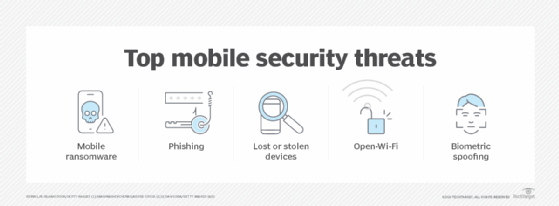
Common mobile security and wireless network attacks include the following:
- Security breaches. Without mobile device security measures, organizations can be vulnerable to malicious software, data leakage and other mobile cyber threats. Security breaches can cause widespread disruptions to the business, including complicating IT operations and affecting user productivity if systems must shut down.
- Phishing and smishing attacks. Phishing attacks trick users into divulging their personal information, such as passwords or credit card details, by posing as trustworthy entities. Phishing attacks typically occur through emails, text messages or fake websites designed to look legitimate. Phishing attempts that are carried out through SMS or text messages are also known as smishing attacks.
- Open Wi-Fi. Open Wi-Fi hotspots, such as those found in coffee shops and hotel rooms, can pose risks to mobile devices. When using open public connections, a device might be susceptible to man-in-the-middle-attacks (MiTM) in which hackers intercept connections between a browser and a mobile device to get access to personal information, spread malware and seize control. To achieve this, cybercriminals can also create honeypot Wi-Fi hotspots that appear legal and free.
- Mobile ransomware. The rise in the use of mobile devices for business purposes has increased the frequency and severity of mobile ransomware, a unique and dangerous type of malware. It encrypts files on mobile devices and requests a ransom for the decryption key, which is necessary to unlock the encrypted data.
- Biometric spoofing. Biometric spoofing in mobile security is the intentional alteration or replication of biometric characteristics to deceive mobile devices that rely on biometric authentication for security. Using fraudulent or manipulated biometric data, attackers can impersonate someone else and mislead authentication mechanisms into granting them access to secured systems. For example, attackers might use forged fingerprints to impersonate a real user's fingerprint features to gain access through Touch ID on an Apple iPhone or iPad. They can achieve this by replicating the victim's fingerprints on items they've touched, such as a doorknob and creating false fingerprints with materials such as gelatin or silicone.
- Cryptojacking. Cryptojacking is a type of mobile threat where unauthorized individuals use someone else's mobile device to mine Bitcoin and other cryptocurrencies without their knowledge or consent. In 2019, several applications infected with cryptojacking JavaScript were discovered on the Microsoft Store. These apps, including Fast-search Lite and Battery Optimizer, exploited users' devices to mine cryptocurrency.
- MitM attacks. MitM attacks occur when an attacker intercepts network traffic to eavesdrop on or change sent data. Mobile devices are especially vulnerable to MitM attacks. This is because SMS messages can be easily intercepted if mobile applications use the unencrypted Hypertext Transfer Protocol instead of the secure Hypertext Transfer Protocol Secure to transport potentially sensitive information.
- Compromised data. A lack of mobile security can lead to compromised employee, business or customer data. If an employee leaves a tablet or smartphone in a taxi or at a restaurant, for example, sensitive data, such as customer information or corporate intellectual property, can be put at risk.
- Unnecessary app permissions. Application security is also a mobile security concern. One problem is mobile apps that request too many privileges, which enables them to access various data sources on the device. Leaked corporate contacts, calendar items and even the location of certain executives could put a company at a competitive disadvantage.
- Infections and malware. Another concern is malicious software or Trojan-infected applications that are designed to look like they perform normally, but secretly upload sensitive data to a remote server. Malware attacks are a common mobile security concern. Experts say Android devices face the biggest threat, but other platforms can attract financially motivated cybercriminals if they adopt near-field communications and other mobile payment technologies.
How does mobile security work?
As is the case with securing desktop PCs or network servers, there isn't one single thing that an organization does to ensure mobile device security. Most organizations take a layered approach to security, while also adopting longstanding endpoint security best practices.
Some best practices pertain to the way the device itself is configured, but other best practices have more to do with the way the device is used.
The following is an overview of how mobile security works:
- Device security. From a device configuration standpoint, many organizations implement policies that require devices to be locked with a password or to use biometric authentication. Organizations also use mobile device security software to deploy and manage devices, audit the OS levels used and remotely wipe a device. For instance, an organization might want to remotely wipe a phone that an employee accidentally left in public.
- Application protection. Mobile apps are susceptible to mobile security attacks. Mobile security aims to safeguard applications by using methods such as code analysis, secure coding practices and app vetting processes to detect and prevent harmful or susceptible apps from being loaded on devices.
- Network security. Mobile devices frequently connect to a variety of networks, including unsecured Wi-Fi and cellular networks. Mobile security entails shielding devices from network-based risks including MitM attacks by using secure network protocols, virtual private networks (VPNs) and network monitoring software.
- Operating system (OS) protection. Safeguarding a device's underlying OS is also part of mobile security. This includes keeping the OS current with the latest security patches and updates, as well as using OS security features such as sandboxing and permission controls to prevent unauthorized access to critical data.
- Mobile device management. Organizations use MDM services to control and secure staff mobile devices. With MDM, businesses can remotely manage and keep an eye on devices, enforce security policies and ensure everyone is following security requirements.
- End-user practices. End-user mobile security best practices might include avoiding public Wi-Fi networks or connecting to corporate resources through a VPN. IT staff can also educate users on mobile threats such as malicious software and seemingly legitimate apps that are designed to steal data.
What are the challenges of mobile security?
Due to the evolving nature of technology and the widespread use of mobile technology, mobile devices and communications face the following security challenges:
- Diverse ecosystem. One of the biggest challenges to mobile device security is the sheer variety of devices that employees potentially use. There are countless makes and models of smartphones, tablets and other mobile devices. MDM software generally supports the more popular devices and the latest mobile OSes, but not all security policy settings work on all devices.
- Evolving threats. Another challenge to mobile device security is the constantly evolving threat landscape. At one time, there were relatively few mobile threats for organizations to worry about. As devices became more widely adopted, however, cybercriminals began increasingly targeting mobile platforms. Hackers are always coming up with new techniques to exploit vulnerabilities in mobile devices and applications. They often use malware, phishing or social engineering attacks to gain unauthorized access to sensitive information.
- Bring your own device (BYOD). Many organizations practice BYOD and let employees use their personal devices for work, creating a challenge for IT to secure a mix of devices with varying security postures. Managing and securing these diverse devices can be complex.
- Data leakage. Data leakage and disclosure of sensitive information from mobile devices can occur from a variety of sources, including misplaced or stolen devices, unsecured wireless networks and illegal access to cloud storage.
- Human factor. Users are frequently the weakest link in mobile security. Lack of awareness, bad password practices and vulnerability to phishing attacks all contribute to security flaws.
- Internet of things (IoT) integration. The integration of mobile devices with IoT can create new security challenges because the interconnection of devices increases the attack surface, necessitating complex security measures.
- App store vulnerabilities. Malicious apps can sometimes get past security measures and into authorized app marketplaces by using techniques such as versioning and disguising themselves as harmless beta versions. This can cause users to inadvertently download and install harmful applications, exposing their mobile devices to potential security threats.
What are the types of mobile device security?
Mobile device security often centers around the use of MDM. MDM capabilities are often available in enterprise mobility management and unified endpoint management tools, which evolved from the early device-only management options.
However, organizations typically use other security tools to enhance their mobile device security which include the following:
- VPNs. VPNs provide a secure connection between a mobile device and a private network, letting users send and receive data as if the device were physically linked to the private network. VPNs use encryption technology to safeguard data transported over shared or public networks, thus improving the security of remote access to company resources.
- Mobile data encryption. Encryption is a critical component of mobile device security, as it entails encoding data to render it illegible by unauthorized users. Data can be encrypted both at rest and in transit. Mobile data encryption helps to protect critical data even if the device is lost or stolen.
- Mobile application security. Mobile applications can pose security risks if not developed or downloaded from verified sources, resulting in compromised devices and data theft. Organizations can reduce mobile application security risks by adopting app vetting, code analysis and secure coding practices.
- Secure web gateway. A secure web gateway enhances mobile security, as it safeguards against online security threats by enforcing security policies and defending against phishing and malware in real time. This enables secure mobile web browsing and stops users from accessing fraudulent websites or downloading harmful content.
- Mobile threat defense (MTD). MTD systems safeguard mobile devices against various threats, including malware, phishing attempts and network-based attacks. These systems detect and mitigate mobile risks through behavioral analysis, machine learning and real-time threat intelligence.
Mobile device security vendors and products
Numerous vendors offer mobile device management and security tools. Examples of the tools available include the following:
- Check Point Software Harmony Mobile.
- Google Endpoint Management.
- Hexnode Unified Endpoint Management.
- IBM Security MaaS360.
- Microsoft Enterprise Mobility + Security.
- Symantec Endpoint Protection Mobile.
- Trend Micro Mobile Security for Enterprises.
- Verizon Lookout Mobile Endpoint Security.
- VMware Workspace One Unified Endpoint Management.
- Zimperium Mobile Threat Defense.
Mobile devices are prone to cybersecurity threats and should be protected against malware assaults in the workplace. Discover practical ways for protecting endpoints from mobile malware in the workplace.