Shared Key Authentication (SKA)

What is Shared Key Authentication (SKA)?
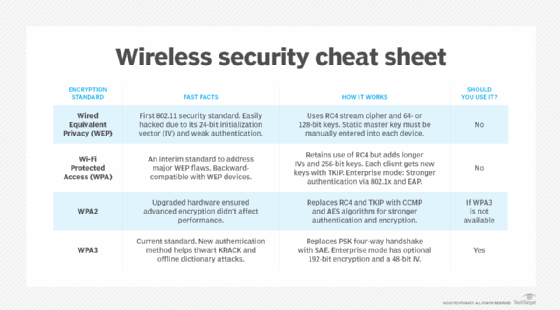
Shared Key Authentication (SKA) is a verification process by which a computer can gain access to a wireless network that uses the Wired Equivalent Privacy (WEP) protocol. With SKA, a computer equipped with a wireless modem can fully access any WEP network and exchange encrypted or unencrypted data.
Based on a shared secret key, this kind of authentication enables a modem to preestablish that the requesting system already knows about the shared secret key needed for authentication. The IEEE 802.11 wireless standard assumes that the key will be delivered to a wireless client through a secure channel that's independent of the standard. It enables users to type in a password and immediately gain access to a Wi-Fi network.
How does Shared Key Authentication work?
A WEP encryption key, obtained in advance by the connecting computer, must match a key stored at the wireless access point (AP) for SKA to work.
Here are steps in the SKA process:
- The computer sends a request for authentication to the AP to begin the connection process.
- The AP responds by generating a sequence of characters called a challenge text.
- The computer encrypts the challenge text with its WEP key and transmits the message back to the AP.
- The AP decrypts the message and compares the result with the original challenge text. If there are no discrepancies, the AP sends an authentication code to the connecting computer.
- The computer accepts the authentication code. It becomes part of the network for the duration of the session or as long as it remains within range of the original AP. If the decrypted message does not precisely agree with the original text, the AP does not allow the computer to join the network.
A wireless-equipped computer can connect to a WEP network AP without shared keys using the Open System Authentication (OSA) process. Still, this method does not enable the computer to receive encrypted data.
SKA is not considered a secure approach to providing network access. This is attributed to the use of conventional unsecured channels to share security keys required for access. However, the authentication process is secured using 64- or 128-bit encryption. This means threat actors cannot gain access without any knowledge about the key.
What is Pre-Shared Key authentication?
WEP, Wi-Fi Protected Access (WPA), and WPA2 Wi-Fi encryption use the Pre-Shared Key (PSK) authentication method. When it comes to WPA, this approach is known as WPA-PSK or WPA2-PSK. When used in Extensible Authentication Protocol, it's called EAP-PSK. Both the clients and wireless AP share the same secret key in all these use cases. This approach to client authentication usually uses a passphrase with eight to 63 American Standard Code for Information Interchange, or ASCII, characters or 64 hexadecimal digits.
SSH Shared Key Authentication
Almost all organizations use Secure Shell (SSH) in their data centers to manage operating systems, configurations and networks. SSH keys are also present in many configuration management tools.
Without SSH, modern cloud computing would not be a reality because SSH makes possible the automation needed for these services. It also makes such services more cost-effective.
SSH keys function like passwords for authentication purposes and control who gets access to what.
What is Azure Shared Key Authentication?
You can use SKA in Azure to authorize any requests made against a storage service. For example, SKA can authorize requests against services such as Blob Storage, Queue Storage and Files.
What is the difference between Open System Authentication and Shared Key Authentication?
OSA lets any user authenticate to the AP and do so without any encryption. This means OSA enables authentication without performing any client verification and only exchanges "hellos" between the AP and client. It's a null authentication. In contrast, SKA only allows wireless clients with a shared key to connect, often with WEP encryption. However, you can use the simple OSA protocol together with more advanced network security authentication approaches, like EAP and PSK authentication.
See how hybrid work requires enterprise Wi-Fi for the home, how to integrate zero-trust practices into private 5G networks, how IT can provide home Wi-Fi help for remote workers and how a researcher cracked 70% of neighborhood Wi-Fi passwords.
Explore how to shield endpoints with IoT device security best practices, the basics of wireless networking for exam prep, how enterprises are mulling 5G vs. Wi-Fi security with private networks, how to implement network segmentation for better security and the difference between 802.11ac vs. 802.11ax.