
ra2 studio - Fotolia
Troubleshoot Bluetooth connection problems in Windows 10
Bluetooth connection problems in Windows 10 are fairly common. Fortunately, there are a variety of troubleshooting steps that IT can take to restore the connection.

Bluetooth technology is mature and widely used, but Bluetooth devices can still experience problems connecting or operating in Windows.
When end users experience Bluetooth connection problems with Windows 10, you as an IT admin can troubleshoot in a few ways.
Check the basics
Any troubleshooting process should start with the basics. First, it's worth a sanity check to verify both the PC and the connecting device support Bluetooth. With so many new devices in the marketplace and varied computer configurations across the organization -- especially in BYOD organizations -- it's common to find one or even both devices do not actually support Bluetooth, making a connection impossible.
Some devices may use Wi-Fi connectivity, rather than Bluetooth connectivity. Quickly inspect the device for a Bluetooth logo as an indication of Bluetooth compatibility, or perform a cursory internet search with the manufacturer to verify the device's specifications. If the device is not Bluetooth-compatible, organizations must exchange or replace it with a suitable device.
Also, take the time to verify Bluetooth support on the PC. A technician can safely skip this step if the PC already employs other Bluetooth devices that are operating properly. If this is the first time connecting Bluetooth devices to a Windows 10 computer, however, you should check that a Bluetooth adapter is installed, working and allowed.
Check Bluetooth activation
Use the Windows 10 Settings interface to check and enable Bluetooth on the computer. Click Start, select Settings, choose Devices, and then pick Bluetooth and other devices. The Bluetooth toggle at the top of the menu should be on, and the system should be discoverable by other Bluetooth devices by its name. If the toggle is off, try simply turning the toggle to the on position. Sometimes, simply toggling Bluetooth off and then on again (Figure 1) can resolve Bluetooth connection problems with Windows 10.
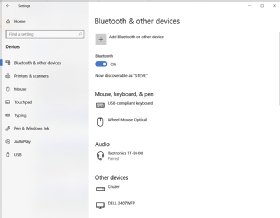
Next, take a look at the Windows 10 notifications panel by clicking the Notifications icon in the right-most end of the Taskbar. If Airplane Mode is on, the computer will not exchange any wireless signals, so make sure the system's Airplane Mode is turned off.
If the Bluetooth toggle is not available or cannot be turned on, the system may not support Bluetooth connectivity. In these cases, run the Bluetooth Troubleshooter or try uninstalling and reinstalling the Bluetooth adapter.
If the system's Bluetooth toggle is available and on, verify that the Bluetooth device is fully charged or connected to a suitable AC adapter. Then, turn the Bluetooth device on, as detailed in the product's documentation. It's not always as simple as an on/off switch; some Bluetooth devices may require users to hold a certain button for several seconds.
Verify that the Bluetooth device is in close proximity of the computer's Bluetooth adapter and free of any close sources of interference, such as wireless handheld telephones and some Wi-Fi devices.
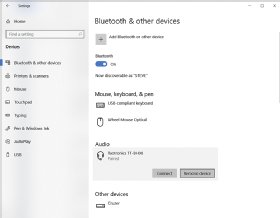
At this point, the Bluetooth device should be discoverable. Use the Bluetooth and other devices interface to identify and pair the device with the computer. If the Bluetooth device does not appear, use the Add Bluetooth or other device option to scan, list and select the specific device for pairing. In some cases, proper pairing may require the specific instructions that accompany the Bluetooth device. Some Bluetooth headset designs, for example, might require users to hold the same buttons that control power for several seconds longer to place the device into its pairing mode before the computer can see and pair with the device.
Finally, it is possible for a paired Bluetooth device to lose its connection to the computer. If a Bluetooth device appears paired with the computer, but the device itself does not seem to respond, use the Bluetooth and other devices interface to remove and then re-pair the Bluetooth device. For example, click Start, select Settings, choose Devices, and then pick Bluetooth and other devices. Highlight the device and click Remove device (Figure 2). Now re-pair the device normally.
Deeper Bluetooth troubleshooting
If Bluetooth capability remains unavailable or the computer fails to pair with a Bluetooth device, you must use more extensive troubleshooting techniques to identify and resolve Bluetooth connection problems with Windows 10.
First, isolate the problem to the device or the PC. The easiest way to do this is to try to connect and use the Bluetooth device on another PC. If the Bluetooth device works on another PC, the problem is not with the device and is probably with the computer. If the Bluetooth device cannot work on any other PC, the problem is likely with the device.
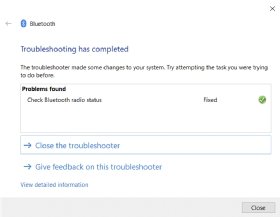
When the problem appears to reside within the computer and Bluetooth seems to be on and available, run the Bluetooth Troubleshooter. Click Start, select Settings, choose Update and Security. Then, scroll down to Find and fix other problems, click the entry for Bluetooth and opt to Run the troubleshooter. The wizard will run, report any issues detected and attempt to remediate any problems (Figure 3). In many cases, the troubleshooter can resolve the issue.
If the Bluetooth Troubleshooter is unable to correct a Bluetooth problem in the PC, you may need to check and reinstall the computer's Bluetooth adapter through the Device Manager. A quick way to access the Device Manager is simply to click Start and select Settings, then type Device Manager into the Find a setting search bar and select the Device Manager response. The Device Manager dialog should open. Locate and expand the Bluetooth entry for the computer. You should see drivers for the Bluetooth adapter and some previously connected Bluetooth devices (Figure 4).
Look for entries marked with a yellow exclamation or red X. Either of these problem icons can indicate an issue with the Bluetooth devices. You can usually correct them by right-clicking the problem entry and selecting Update driver from the context menu. If all of the Bluetooth entries appear to be operating correctly, you should remove and reinstall the Bluetooth adapter.
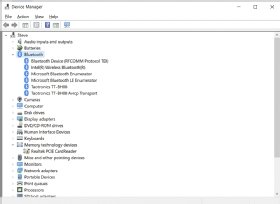
Right-click the Bluetooth adapter entry from the list of Bluetooth devices. The adapter may contain the word "radio." In Figure 4, it's the Intel Wireless Bluetooth entry. Select Uninstall device from the context menu. This should remove the Bluetooth adapter from the list of devices. Now, power the PC down, wait 30 seconds and power the PC back up.
Windows should now see the hardware and attempt to automatically install the appropriate drivers -- essentially reenabling the Bluetooth adapter. If this does not happen automatically, use the Device Manager to scan for hardware changes, which should accomplish the same outcome. Verify that the Bluetooth adapter is back in the Device Manager list, with no problems reported, and then try connecting the Bluetooth device normally.
If problems persist, check for any updated Bluetooth adapter drivers. In most cases, simply opening the Device Manager, expanding the list of Bluetooth devices, right-clicking the Bluetooth adapter and selecting Update driver from the context menu should allow the system to search the internet for the latest vendor driver. There is a small possibility, however, that a patched or updated driver might not be available for automated updates, and you may need to install it manually.
The easiest approach is to download and install the latest Bluetooth adapter driver as a self-installing executable file. In that case, just run the executable from the download folder to install the newest driver. If the driver was downloaded as a nonexecutable folder, use the same process to update the driver, but instead of allowing the PC to search the internet, opt to Browse my computer for driver software. Select Browse, navigate to the location of the new driver, click OK and select Next to start the installation process. When the installation is complete, restart the PC and try connecting the Bluetooth device normally.