What is wireless communications? Everything you need to know
Wireless communications is the transmission of voice and data without cable or wires. In place of a physical connection, data travels through electromagnetic signals broadcast from sending facilities to intermediate and end-user devices.
The first wireless transmitters went on the air in the early 20th century using radiotelegraphy, which is radio communication using Morse code or other coded signals. Later, as modulation made it possible to transmit voice and music wirelessly, the medium became known as radio. Wireless transmitters use electromagnetic waves to carry voice, data, video or signals over a communication path.
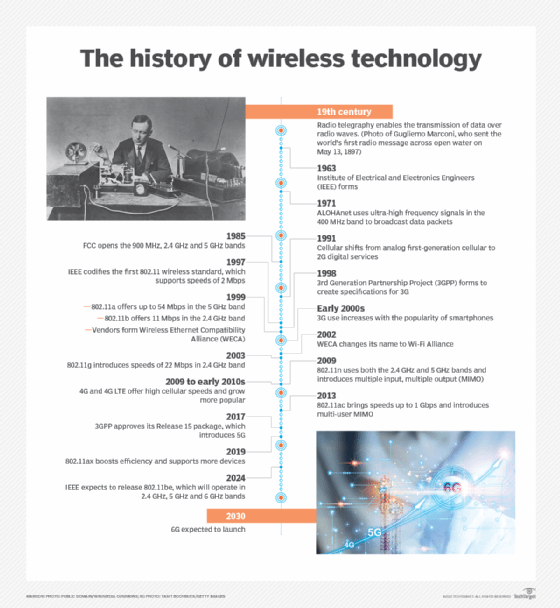
The groundwork for modern wireless networking was laid in the early 1970s with the launch of ALOHAnet in Hawaii. The network, technically a wide area network (WAN), relied on ultra-high frequency signals to broadcast data among the islands. The technology underpinning ALOHAnet helped fuel the creation of Ethernet in 1973 and played an important role in the development of 802.11, the first wireless standard.
The evolution of wireless features
As a medium, wireless communications has been around for more than a century. But it's only been in the past 15 years -- particularly after the ratification of the 802.11ac and 4G standards -- that the technology evolved enough to permit the development of applications and services comprehensive enough for widespread enterprise and consumer adoption.
To that end, wireless features have evolved from simple data transfers -- at rates of only 54 Mbps -- to operations that require gigabits of data to complete.
Each new generation of wireless communications creates more sophisticated capabilities, giving users more flexibility in how they access the information and services they need. As a result, people can now connect to resources from almost anywhere. At the same time, mobile devices have become more powerful and versatile, giving users the opportunity to complete complex tasks. Advances in performance, capacity and coverage will only continue.
The maturation of the technology means that people with wireless networking skills continue to be in demand. Wireless certification programs, among them those offered by Cisco and the Computing Technology Industry Association, help give employees the skills they need to maintain and support wireless systems of the future.
What is a wireless network?
A wireless network is a grouping, or network, of multiple devices where data is sent and received over radio frequencies.
Wireless networks differ from wired networks, which require each end of a data connection to be physically connected by a cable in order for communication to take place. Wireless networks make it possible for organizations to eliminate the dedicated wired cabling required to connect endpoint computing devices -- such as tablets, laptops and smartphones -- to embedded and peripheral devices. Wireless backhaul is often part of large service provider networks.
Wireless networks generally include some form of radio transmission for broadcasting and receiving wireless signals across a specified range of electromagnetic radiation spectrum, commonly referred to simply as spectrum. The transmission of data across a wireless network is typically done with antennas, which are often small, embedded pieces of hardware within a given device. Different wireless networks use various frequency ranges of spectrum. Within the spectrum, different channels help reduce the risk of congestion within a given spectrum frequency.
Examples of wireless devices and equipment
A wide variety of wireless equipment enables users to stay connected without being tethered by wires. The Wireless Application Protocol, among other important standards, governs how these devices access the internet and other resources. Common examples of wireless equipment include the following:
- Cellular phones provide connectivity for portable and mobile applications, both personal and business.
- Cordless telephones are limited-range devices within a home that include a base tethered to a wall with cordless handsets.
- Global positioning systems enable car and truck drivers, boat and ship captains, and aircraft pilots to ascertain their location anywhere on Earth.
- Cordless computer peripherals include devices such as wireless mice, keyboards and printers, which can be linked via wireless protocols including Wi-Fi and Bluetooth.
- Wireless LANs (WLANs) enable users to access a network without requiring a wired connection.
- Wireless routers enable users to connect to the internet at home or in the office by using Wi-Fi. Wireless routers typically include a wired connection that enables connectivity to the internet, with antennas that provide wireless connectivity for users.
- Laptops and tablets are Wi-Fi-enabled mobile computing devices that provide wireless connectivity.
- Infrared (IR) wireless uses devices that convey data via IR radiation; it is used in certain limited-range communications and control systems.
Types of wireless networks
Wireless networks serve different needs. The different types of wireless networks include the following:
- Wireless LAN. A WLAN uses radio technology instead of wires to connect nodes along the network. Wi-Fi is the transmission method used to communicate over a WLAN via wireless access points (APs) that enable connectivity with endpoint devices, using standards set by the IEEE.
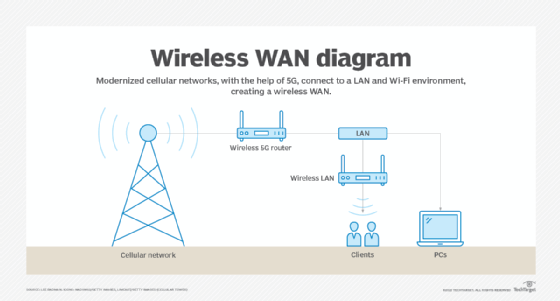
- Wireless wide area network. A WWAN is sometimes referred to as mobile broadband. WWANs use cellular technologies to create a wireless network that spans a large geographic distance and supports a variety of services.
- Wireless metropolitan area network. A WMAN provides access outside office and home networks. It is larger than a WLAN but smaller than a WWAN.
- Fixed wireless. Fixed wireless networking is a way to deliver last-mile internet connectivity to households and businesses over airwaves rather than through wired fiber or cable television connections. Fixed wireless is particularly suitable for rural areas where wired connectivity isn't widely available, or in areas where satellite internet services are the only available option.
- Wireless personal area network. A WPAN is generally enabled with short-range wireless technology, such as Bluetooth, to connect with keyboards, mice, headphones and other devices.
- Municipal wireless network. An MWN is a wireless network operated by a local government authority. It provides access to users across a given geography.
- Citizens Broadband Radio Service. CBRS is based on radio spectrum authorized by the Federal Communications Commission in 2020. CBRS signals can cover many miles and aren't limited to line-of-sight limitations -- which is different than Wi-Fi networks -- thus enabling organizations to use CBRS to construct private LTE networks and underpin WAN deployments. CBRS networks are particularly well suited for environments where reliability is critical, such as industrial and healthcare deployments. When deploying CBRS, enterprises should follow certain best practices, usually starting simple then adding layers of complexity later.
- Wireless mesh network. A WMN is created by connecting the wireless nodes installed at each user's location. This design is decentralized and is more straightforward because each node only has to transmit as far as the next node. WMNs can be standalone or they can be connected to the internet. They are reliable and scalable, but they can be more difficult to monitor because there isn't a central server.
- Wireless ad hoc network. A WANET is a wireless network that can be created spontaneously without requiring the use of a router or wireless AP. Instead, WANETs rely on peer-to-peer technology, and each device that is part of the network -- such as a wireless PC or smartphone -- is responsible for network operations.
Types of cellular networks
Several types of cellular networks are used for wireless communications. For much of the 1990s and 2000s, cellular networks were supported by two standards: global system for mobile communications (GSM) and code-division multiple access (CDMA).
GSM and CDMA each had its own access methodologies that applied to 2G and 3G cellular specifications. With the advent of 4G/LTE and especially 5G, the distinctions between the two technologies have diminished and carriers are in the process of retiring their older GSM and CDMA networks.
Modern cellular networks are typically defined in terms of which generation of wireless standard is supported. Here's a look at the different types of cellular networks:
- 2G. This first major wave of cellular technology adoption was introduced in 1991, with speeds limited to 50 Kbps.
- 3G. Third-generation networks began to appear in 2001. 3G offered increased bandwidth and signal quality over 2G and provided a peak speed of 7.2 Mbps.
- 4G/LTE. Fourth-generation wireless and LTE began to appear in 2009 as successors to 3G. As opposed to the 2G and 3G standards, the International Telecommunication Union specified a strict minimum data rate for 4G. To be considered 4G/LTE, the cellular networks have to transmit and receive at 100 Mbps.
- 5G. Fifth-generation wireless was first introduced as a technical standard in 2016, and carriers began to deploy it in 2019. 5G provides more bandwidth than its predecessors, data speeds that can range as high as 20 Gbps and ultra-low latency -- five milliseconds or less. These networks can either be public or private 5G, and the standard has fueled a variety of new business cases, among them autonomous automobiles and sophisticated industrial control systems.
Advantages of wireless technology
Wireless communications offer several cost and connectivity benefits for organizations. The rapid rise of remote work -- fueled in part by the pandemic that began in 2020 -- has created an environment where employees demand high-performance access to network resources regardless of where they might be.
Wireless networks can be less expensive to build and maintain, requiring fewer switches and other components required by wired infrastructures. New wireless standards -- chief among them multiuser, multiple input and multiple output -- enable physical APs to serve a greater number of users, further reducing costs.
Wireless technologies also support novel services, among them location tracking, IoT deployments and remote diagnostics. Finally, advances in wireless performance enable organizations to stress mobility as a primary benefit, thus helping them redefine how they design their offices and workgroups.
Challenges of wireless technology
Setting up a business Wi-Fi network requires careful planning and design strategies to ensure APs and other components are installed correctly and that users get access to the services and applications they need. Wireless site surveys are a must to ensure adequate coverage and signal strength, as well as to determine that any interference across the network is minimized as much as possible. The different types of site surveys include predictive, passive and active. A comprehensive wireless network evaluation usually requires all three types of these surveys.
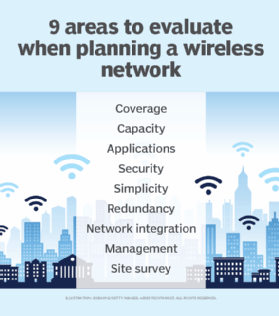
Wireless security presents particular challenges, requiring organizations to put together a comprehensive strategy to protect WLANs and cellular connections from data loss. The sheer number of devices connecting to a wireless network -- from laptops to specialized IoT devices -- dramatically increases the network's exposure to threats from attackers. Although security standards, such as Wi-Fi Protected Access, provide substantial protection against hackers, some vulnerabilities remain. Organizations routinely face different types of wireless network attacks and should take proper proactive measures to prevent them.
Wireless network components, such as Wi-Fi 6 APs, require more power; enterprises will need to replace Power over Ethernet switches and other underlying infrastructure to support the newest standards, even as they maintain legacy components. Price points and carrier pricing will remain in flux as suppliers roll out new equipment.
Additionally, troubleshooting wireless networks can be complicated. This is in part because users are so distributed and use a wide variety of devices. Organizations must also craft strategies and devote resources to ensure that remote workers can safely and reliably access corporate services and applications to do their jobs.
What is the difference between Wi-Fi and wireless networking?
Wi-Fi is a specific subset of wireless communications defined by a set of technical specifications outlined by the IEEE under the designation 802.11. The wireless industry has seen multiple Wi-Fi standards, among them 802.11a/b/c/g/n/ac/ax, each providing different performance characteristics. Wi-Fi networks have their own security protocols, which augment network control and access policies that might already be in place. These wireless security protocols work in different ways to help secure enterprise networks.
To make it easier for consumers to understand the different versions of Wi-Fi, the Wi-Fi Alliance, an industry-backed promotional organization, no longer labels the technology by its IEEE designation. As a result, the most recent standard, 802.11ax, is now identified as Wi-Fi 6. Wi-Fi 6 represented a significant technological upgrade from Wi-Fi 5, with throughput, modulation and performance standards that permitted organizations to accelerate their Wi-Fi.
A variation of Wi-Fi 6, dubbed Wi-Fi 6E, features capabilities enabled in part by its use of the 6 GHz spectrum. The next iteration of the standard, 802.11be, is also called Wi-Fi 7 and is expected to be released in 2024.
Wi-Fi is typically accessed through WLANs, which use radio technology instead of wiring to connect nodes. An AP or router broadcasts a service set identifier beacon. An endpoint device or user with a Wi-Fi-enabled network interface then connects with the AP to enable the Wi-Fi transmission.
The wireless industry and the future of the market
Wireless communications is now a fundamental part of enterprise networking. Advances in both the Wi-Fi and cellular markets have all but eliminated the performance gap between wired and wireless infrastructures, enabling organizations to go wireless-first and rely on their wired networks on an as-needed basis. Wi-Fi 7 will bring further performance benefits, including increased throughput, the ability to connect more devices and a reduction in latency. The standard will support a maximum throughput of at least 30 Gbps, more than three times the throughput of Wi-Fi 6.
At the same time, work is underway to develop 6G, the next cellular standard. Among 6G's benefits is low latency -- one microsecond -- with throughput and capacity capabilities engineered to surpass 5G.
As capacity and performance characteristics supported by these standards converge, wireless communications enables users to switch seamlessly between Wi-Fi and cellular connectivity, affording consumers the ability to access the services, security protections and resources they need regardless of location.